ProRiders Garage Colours, LEDs & Stickers
Make the scooter yours — after it can stop, turn, and survive a Kirin Bay session.
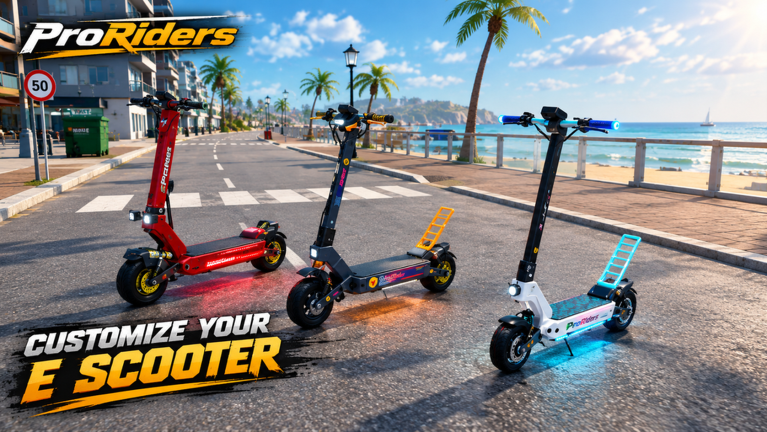
The garage is where ProRiders stops being “a rental” and starts being your scooter. Colours, LEDs, and stickers turn a stock frame into a rideout identity — especially in 10-player lobbies where the same nine faces will recognize your light bar from a block away. This guide covers the phone → garage workflow, what each cosmetic layer is for, and the hard rule that keeps wallets alive in beta: spend cosmetics after performance parts.
ProRiders [BETA] by briz_developer soft-launched around 2026-10-13 in Kirin Bay. Systems still move (place updates continued through mid-November 2026), so treat shop labels as live. For money priority, keep Earn Money open. For what actually makes you fast and safe, use Tuning & VESC, Parts Tier List, and the Scooter Tier List.
Phone workflow: open garage the right way
Your phone is the hub. Learn the apps that matter for customization nights:
| App | Garage-night job |
|---|---|
| Garage | Spawn, despawn, apply colours / LEDs / stickers, review the machine |
| Store | Buy parts and cosmetics when stock allows |
| Bank | Confirm you still have a buffer after the shopping spree |
| Maps | Plan a show-off cruise that avoids camera traps |
| Messages / Contacts | Coordinate LED-matched rideouts with friends |
Habit loop:
- Open Bank — know the number before you fall in love with a wrap.
- Buy brakes / tyres / battery / motor / VESC needs first if anything is weak.
- Only then open cosmetic aisles in Store.
- Apply looks in Garage, spawn, and take a short validation ride.
- If the tune feels angry, revert priorities — paint does not cool a burning controller.
Day-one phone literacy also lives on Getting Started and Controls.
Colours — readable identity
Colours are the cheapest personality layer. Goals:
- Visibility at dusk on beach promenades without becoming a disco seizure.
- Squad matching for rideouts (see Players etiquette).
- Contrast so stickers and LED edges still read on screenshots.
Tips:
- Pick a base that still looks clean under streetlights downtown.
- Avoid changing colour every ten minutes during a money grind — decisions burn time that deliveries pay for.
- If you share a garage theme with friends, agree on one accent so the pack reads as intentional, not random.
LEDs — night flex with manners
LEDs are the Kirin Bay night-time signature. They photograph well on wheelie holds and garage pose shots — just remember:
- Light does not add grip.
- Bright builds attract attention from players and from situations you may not want during police heat — Police & Heists.
- Sync colours for rideouts; desync when you need to practice alone without a parade.
Use LEDs as a reward after a clean session: hit a delivery quota, land Winner practice, or survive a tune change without a burn — then light up.
Stickers — storytelling on panels
Stickers are micro-lore. Players use them to mark milestones informally: first Holy Fast night, first fair race win, first full LED set. This wiki will not invent shop SKUs or fake prices; beta stock rotates. Principles beat catalogs:
- Place stickers where cameras (real player cameras) actually see them mid-ride.
- Do not cover functional cues you personally use (some riders like clean cockpit sightlines).
- Buy stickers with surplus cash, never with the last dollars you needed for tyres.
Performance before paint (non-negotiable)
Cosmetics are content. Parts are survival. Recommended spend order for almost every archetype:
- Brakes
- Tyres
- Battery
- Motor
- VESC (incremental — burn risk is real)
- Colours / LEDs / stickers
Why this order keeps badges realistic:
- Holy Fast and Faster than light! need traction and thermal discipline, not a sticker pack — Badges.
- Winner needs braking markers more than a light show — Races.
- Millionaire needs uninterrupted job loops; bankrupt cosmetics resets hurt more than ugly scooters — Jobs & Delivery.
Community nicknames (Kukirin-class, Kaboo/Kaabo-class, Dualtron-class, Teverun chatter) describe power fantasies. None of them exempt you from the order above.
Validation ride after every garage session
Never leave the garage as a menu warrior. Spawn and:
- Roll a beach or hill practice strip.
- Confirm brake bite and tyre feel.
- Attempt one controlled Wheelies hold if that is your style goal.
- Check that LEDs are not distracting you in first person.
- Glance at Maps before any motorway flex.
If VESC or motor behavior changed while you were shopping cosmetics, stop the photo shoot and re-read Tuning & VESC.
Rideout and social use
Garage looks shine hardest when shared:
- Meet at a garage landmark, sync LEDs, roll as a pack.
- Keep packs respectful of delivery riders — Players.
- Gift passes only with consent if someone wants help unlocking cosmetics faster — Generous badge context on Game Passes.
- Do not shame C-tier frames with empty LED slots; beta economies differ by playtime.
Common garage mistakes
- Emptying the bank on stickers the night before a parts sale.
- Maxing LEDs on a scooter that still cannot stop for downtown lights.
- Changing wraps instead of practicing race starts.
- Ignoring Bank until the purchase fails mid-checkout.
- Assuming a cosmetic unlock equals a speed badge — it does not.
Suggested customization nights
Budget night: One colour pass + save the rest for tyres.
Squad night: Shared LED palette after everyone has working brakes.
Milestone night: Stickers after Holy Fast, Winner, or a clean Millionaire session checkpoint.
Photo night: Beach dusk cruise with Maps awareness — no camera tickets for a thumbnail.
Related pages
- Earn Money — surplus cash rules.
- Tuning & VESC — what to buy before paint.
- Parts Tier List — qualitative part priorities.
- Races — when looks meet grids.
- Guides Hub — full how-to index.
Make the scooter loud after it is trustworthy. In Kirin Bay, the best garage flex is still arriving at the meet with a machine that did not burn on the way.
Frequently Asked Questions
Quick answers for Kirin Bay riders.
How do I open the garage in ProRiders?
Use the in-game phone’s Garage app to spawn your scooter and apply colours, LEDs, and stickers. Learn the phone layout in Getting Started and Controls.
Should I buy LEDs before a new motor?
No. Buy brakes, tyres, battery, motor, and careful VESC changes before cosmetics. Paint does not fix stopping distance or burn risk.
What cosmetics can I change?
Players customize with colours, LEDs, and stickers through the garage/store flow. Exact stock rotates in beta, so check the in-game store.
Do cosmetics help with badges?
Only indirectly for social goals like rideouts or gifting. Speed and race badges need parts and skill — see Badges, Races, and Tuning & VESC.
How should squads use LEDs?
Pick a shared palette, meet at a garage landmark, and keep packs respectful of delivery riders in 10-player servers.