ProRiders Guides Hub
From first scooter spawn to Holy Fast runs — every practical walkthrough in one place.
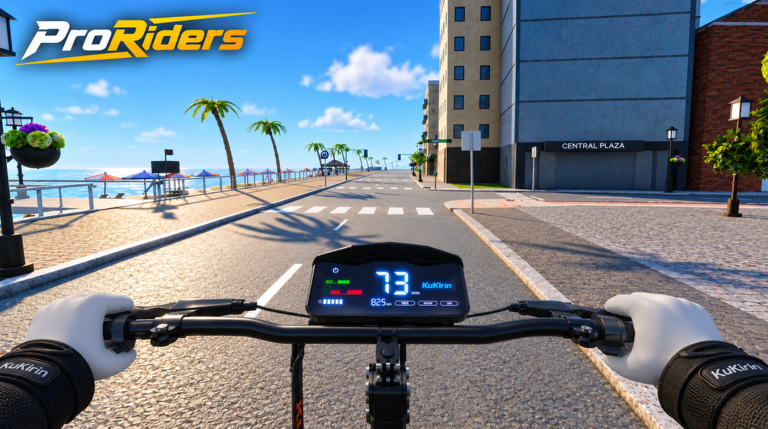
Welcome to the ProRiders guides hub. ProRiders [BETA] by briz_developer is an electric scooter life sim set in Kirin Bay — beach streets, downtown blocks, hill climbs, and a motorway watched by speed cameras. Servers hold up to 10 players. You tune motors, batteries, tyres, brakes, and VESC, race city routes, pull wheelies, dodge police, deliver food, take jobs, and customize your garage with colours, LEDs, and stickers. The in-game phone ties it together: store, garage, maps, bank, messages, and contacts.
This hub is the map of every how-to on the wiki. Use it when you search a mechanic, when a friend asks “how do I make cash?”, or when you are chasing badges like Welcome!, First Ride, Winner, Holy Fast, Criminal, Generous, Millionaire, and Faster than light! — the full checklist now lives on Badges.
Start here
New to the experience? Open Getting Started first. It covers joining the place, spawning your scooter, learning the phone UI, visiting the garage, completing a safe first ride, earning early cash, and picking up Welcome! and First Ride. After that, skim Controls so PC and mobile inputs feel natural before you attempt long wheelies or aggressive tuning.
Active promo gifts live on Codes. When you are ready to compare motors and setups instead of guessing, jump to the Tier List and Parts Tier List. Community tooling notes sit under Scripts. Patch notes and BETA changes live on Updates. Creator and social destinations are collected on Links, and player-facing gifting themes appear under Players plus Game Passes.
Money, jobs, and risk
Cash is the backbone of progression. Earn Money ranks riding, deliveries, jobs, races, and heists, plus a smart spend order so you buy performance parts before pure cosmetics. For the delivery loop and phone job apps, use Jobs & Delivery. If you want the Criminal badge or need to survive speed cameras and pursuits, read Police & Heists before you blow a clean Millionaire run.
Riding skill, races, and tuning
Wheelies are both style and income. Wheelies explains balance, safe roads, and why long holds matter for XP and cash. When you want a fair grid and the Winner badge, open Races for prep, Kirin Bay routes, and 10-player etiquette. When you outgrow stock power, Tuning & VESC walks through motors, batteries, tyres, brakes, and the real risk of pushing VESC until the motor burns. Chase Holy Fast (100 km/h / 60 mph) and Faster than light! (240 km/h / 150 mph) with builds that still brake and turn — not glass cannons that explode on the first hill.
Garage looks and city geography
Colours, LEDs, and stickers belong after the machine can stop and turn. Garage Customization covers the phone garage workflow and why cosmetics wait. Geography still decides almost every route: Kirin Bay Map breaks down beach, downtown, hills, and the motorway, with landmarks for store, garage, races, and camera clusters. Cross-link from the map into jobs, police, races, and earn-money pages whenever you plan a loop.
Full guide index
| Guide | Best for |
|---|---|
| Getting Started | Day-one join, phone, garage, first badges |
| Controls | PC/mobile ride, brake, wheelie, phone |
| Earn Money | Cash methods and spend priority |
| Wheelies | Balance practice and payout riding |
| Tuning & VESC | Parts, VESC risk, speed badges |
| Police & Heists | Cameras, pursuits, Criminal badge |
| Jobs & Delivery | Food runs and job efficiency |
| Kirin Bay Map | Districts and landmark routes |
| Badges | All 8 official badges checklist |
| Races | Winner badge, prep, lobby etiquette |
| Garage Customization | Colours, LEDs, stickers after parts |
How to use these guides together
A strong early session looks like this: claim any active Codes, finish Getting Started, confirm Controls, then grind a clean money loop from Jobs & Delivery while learning landmarks on the Kirin Bay Map. When cash stacks, open Tuning & VESC and the Tier List before you buy flashy LEDs on Garage Customization. Practice Wheelies on quiet beach or hill roads, not the camera-heavy motorway. Queue fair grids with Races once brakes feel honest. Track every achievement on Badges. Only after a stable income should you dabble in Police & Heists.
ProRiders is still in BETA (soft launch ~2026-10-13) with strong traction — 1.2M+ visits, roughly 23k favorites, peak CCU 2237 on 8 November 2026, and concurrent counts often past 1k. Expect systems to shift; when something changes, check Updates and re-verify badge thresholds in-game.
Sibling guides link to each other on purpose. Follow those anchors instead of searching the whole site every time. If you only bookmark one page from this hub, make it Getting Started — then return here whenever you need the full index.
Frequently Asked Questions
Quick answers for Kirin Bay riders.
Which ProRiders guide should I read first?
Start with Getting Started for join, phone, garage, and First Ride. Then Controls, then Earn Money or Jobs & Delivery depending on whether you want mechanics or cash next.
Do these guides cover badges?
Yes. Use the Badges guide for the full checklist of all eight. Getting Started covers Welcome! and First Ride; Races covers Winner; Tuning & VESC covers speed badges; Police & Heists covers Criminal; Earn Money covers Millionaire; Game Passes covers Generous.
Is ProRiders still in BETA?
Yes. ProRiders [BETA] by briz_developer soft-launched around 2026-10-13. Features can change — cross-check Updates after major patches.
Where do codes and tier rankings live?
Promo codes are on the Codes hub. Scooter and parts rankings live on the Tier List (including the Parts Tier List). This Guides hub focuses on how-to walkthroughs.
How many players are on a ProRiders server?
Servers support up to 10 players. Plan races and heists knowing the lobby stays small and social.
Where are races and garage cosmetics explained?
Open the Races guide for Winner prep and etiquette, and Garage Customization for colours, LEDs, and stickers after performance parts.